
Transcribe audio to text free
- First 5 minutes free, no sign-up
- Speaker labels and timestamps
- Copy the text right here
- Files deleted after 24 hours
No account needed for the first 5 minutes of a file. To download Word, PDF or subtitles, transcribe the rest or use 100+ languages, create a free account: your file comes with you.
How to transcribe audio to text in 3 steps
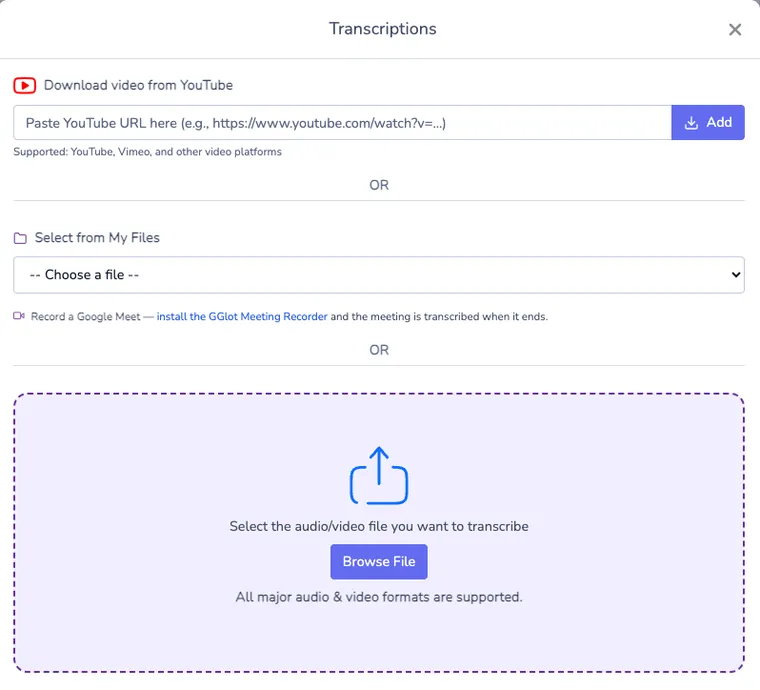
- UploadDrop an audio or video file, or paste a YouTube link. 15 formats, up to 2 GB.
- Let the AI workPick the spoken language. GGlot writes the transcript with timestamps and speaker labels, usually within minutes.
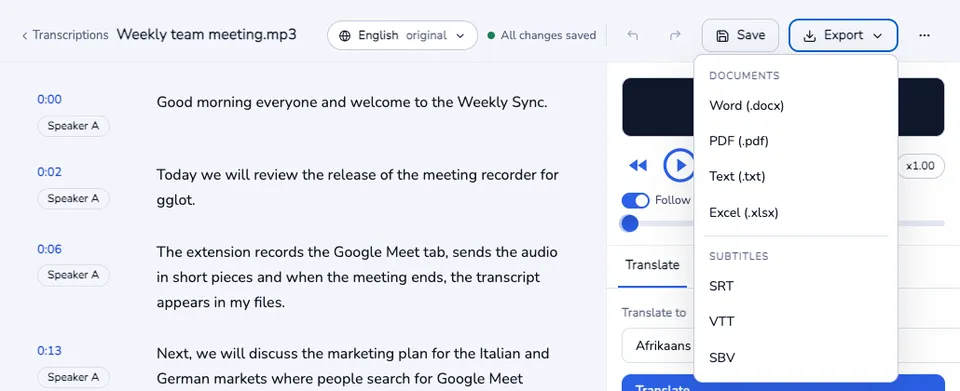
- Edit and downloadFix any word in the online editor, then download TXT, DOCX, PDF, SRT or VTT, or translate it into another language.
Supported formats
Audio: MP3, WAV, M4A, AAC, FLAC, OGG, WMA
Video: MP4, MOV, AVI, MKV, WEBM, WMV, FLV, M4V
What you get
- A transcript with timestamps and speaker labels
- Subtitles you can edit, burn into the video or export
- Translation into 100+ languages
- An AI summary and AI voice-over on the paid plans
Audio transcription that does the typing for you
Typing up a one-hour recording by hand takes hours. GGlot does the first pass for you in minutes: speaker labels, timestamps and punctuation included. You spend your time checking the text, not typing it.
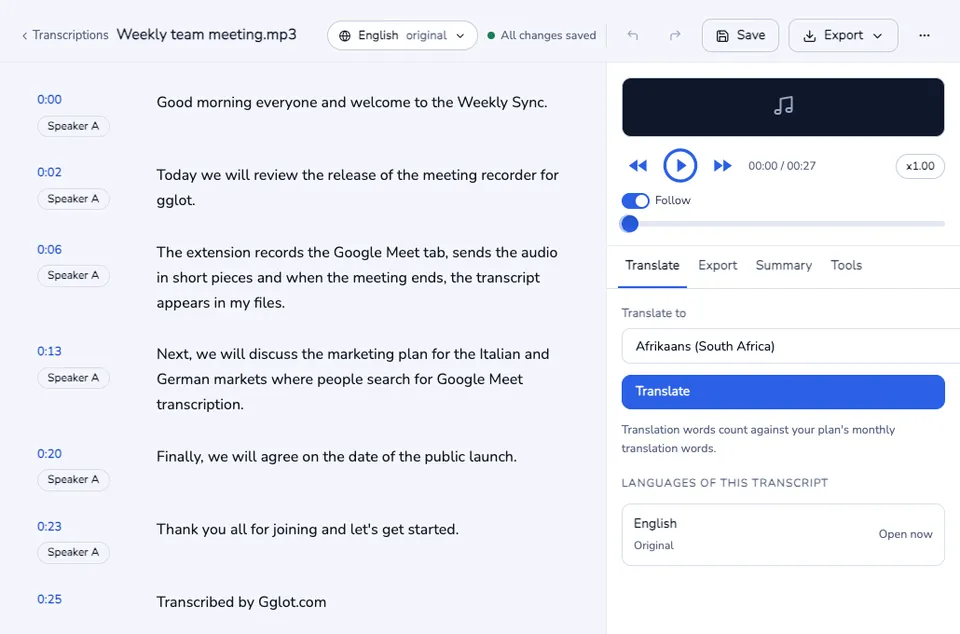
The online editor shows the transcript next to the audio. Click any line to hear it, correct a word, rename a speaker, then export TXT, DOCX, PDF, SRT or VTT. On the paid plans you can also get an AI summary of the whole recording.
Accuracy depends most on the recording. One speaker close to a good microphone transcribes best; noisy rooms and crosstalk need more editing. Pick the right spoken language before you start, from 100+ supported.
What people use it for
- Qualitative research and focus groups
- Journalism and interviews
- Legal and business meetings
- Students recording lectures
- Podcasters and YouTubers
How GGlot compares
| GGlot | Otter.ai | TurboScribe | Happy Scribe | |
|---|---|---|---|---|
| Free plan | 30 minutes every month, files up to 60 minutes | 300 meeting minutes a month, but only 3 file uploads in total | 3 files a day, up to 30 minutes each | 10 free minutes on the Free plan |
| Lowest paid plan | $14.99 a month for 150 minutes (Storage) | $16.99 a month per user (Pro), $8.49 billed yearly: 1,200 minutes, 10 file uploads a month | $10 a month billed yearly ($120): unlimited transcription for one person | $17 a month for 120 minutes (Basic), $8.50 a month billed yearly |
| AI dubbing | Yes, AI voice-over and dubbing in 60+ languages (paid plans) | Not stated on their pricing page | Not stated on their pricing page | Not on the pricing page |
| Full comparison | GGlot vs Otter.ai | GGlot vs TurboScribe | GGlot vs Happy Scribe |
Competitor plans as published on their pricing pages on 6 November 2026. Prices change; check before you buy.
See it in the app
How long does it take?
Measured on 2,260 files transcribed with Gglot between 27 October and 26 November 2026.
What an audio transcript looks like
This is the format you get: each paragraph has a timestamp and a speaker label, and punctuation is added for you. In the editor, clicking a line plays the audio from that point.
00:00:02 Speaker A Thanks for making the time. Can you start by telling me how the project began?
00:00:07 Speaker B Sure. It started in 2021 as a small pilot with three schools. We wanted to see whether recorded lectures with transcripts helped students revise.
00:00:19 Speaker A And did they?
00:00:21 Speaker B They did. Students searched the transcripts for the parts they had missed, instead of replaying the whole hour.
Rename Speaker A and B to real names in the editor, then download the transcript as Word (DOCX), PDF, plain text or subtitles (SRT, VTT).
Speech to text in 100+ languages and dialects
Choose the language that is spoken before you start. Gglot recognises 100+ languages and regional dialects, including:
- English (US, UK, Canada, Australia, India)
- Spanish (Spain, Mexico, US)
- French (France, Canada)
- German
- Portuguese (Brazil, Portugal)
- Italian
- Dutch
- Polish
- Russian
- Ukrainian
- Turkish
- Arabic
- Hebrew
- Hindi
- Bengali
- Japanese
- Korean
- Chinese (Mandarin, Cantonese)
- Vietnamese
- Thai
- Indonesian
- Tagalog
- Swedish
- Greek
Recordings that mix two languages work best when you pick the main one. Once the transcript is ready you can translate it into another language in the same editor.
Voice to text from your phone: memos, calls and voicemail
Most recordings start on a phone. On an iPhone, open Voice Memos, tap the recording, choose Share and then Save to Files: you get an M4A file that you can upload here. On Android, recorder apps save MP3 or M4A files. Voicemail and call-recording apps can usually share a recording as an audio file too.
Guides for each kind of recording: voice memos, voicemail, interviews and meetings.
More ways to transcribe audio
By recording
Frequently asked questions
How do I transcribe audio to text for free?
Choose the spoken language and drop the recording on this page. Gglot transcribes the first 5 minutes right here, with no account and no card, usually in about a minute. With a free account the first 5 minutes of every file are free, up to 30 minutes a month; longer files unlock with a $2 7-day trial, a one-time payment or a plan.
Do I need an account?
Not for the first 5 minutes of a file: read and copy the transcript on this page. Create a free account (Google or email) to download Word, PDF or subtitle files, edit the text, use all 100+ languages and transcribe the rest of the recording. The file you transcribed here moves into your account. Files without an account are deleted after 24 hours.
Is this AI or human transcription?
AI. Gglot's speech recognition writes the transcript, adds punctuation and labels the speakers. You can check and correct it in the online editor, which plays the audio from any line you click.
Which file formats can I upload?
MP3, WAV, M4A, AAC, FLAC, OGG, WMA, MP4, MOV, AVI, MKV, WEBM, WMV, FLV and M4V, up to 2 GB per file. You can also paste a YouTube link.
Which languages does it support?
GGlot recognises speech in 100+ languages and dialects, and can translate the result into 100+ languages.
What can I download?
TXT, DOCX and PDF for the transcript, SRT and VTT for subtitles, or a video with the subtitles burned in. Speaker labels and timestamps are included.
Can it tell different speakers apart?
Yes. Gglot labels each speaker (Speaker A, Speaker B...) and you can rename them in the editor, for example to the names of the people in an interview.
How long does it take to transcribe a 30-minute recording?
On a paid plan it is usually ready in about 30 seconds (75% of 15 to 40 minute files finished within 48 seconds in November 2026). On the free plan it runs in the standard queue and takes about as long as the recording.
How accurate is the transcript?
Clear speech recorded close to the microphone usually needs only a few corrections. Music, crosstalk and phone audio lower the accuracy, so the editor plays the audio from any word you click and lets you fix it before you download.
Do I need to install anything?
No. Gglot works in the browser on Windows, Mac, Chromebook and phones. Upload the file, and download the transcript when it is ready.
Who can see my files?
Only you, and team members you invite to your account. You can delete a file and its transcript at any time from My Files.
Can I transcribe a video?
Yes. Upload an MP4, MOV, MKV or another video file, or paste a YouTube link, and Gglot transcribes the speech. See Transcribe video for subtitles and burned-in captions.
What is the longest file I can transcribe?
Files can be up to 2 GB. One free file can be up to 60 minutes long; paid plans take recordings of 60 to 240 minutes per file.
How do I transcribe a voice memo from my iPhone?
Open Voice Memos, tap the recording, choose Share, then Save to Files. Upload the M4A file here. You can also share it straight to your email and upload it from your computer.
How do I transcribe an audio file in Microsoft Word?
Word for the web has a Transcribe button (Home, then Dictate, then Transcribe) for Microsoft 365 subscribers, with a monthly limit on uploaded audio and fewer languages. For more languages, subtitles or longer files, transcribe the recording in Gglot and download the transcript as a DOCX file that opens in Word.
Can ChatGPT transcribe an audio file?
ChatGPT can turn short spoken input into text, but it is not made for transcribing long recordings: you do not get timestamps on every line, speaker labels, an editor that plays the audio, or SRT and VTT subtitle files. Gglot is built for exactly that.